
How it works
From the first input to the calculation package, in six steps.
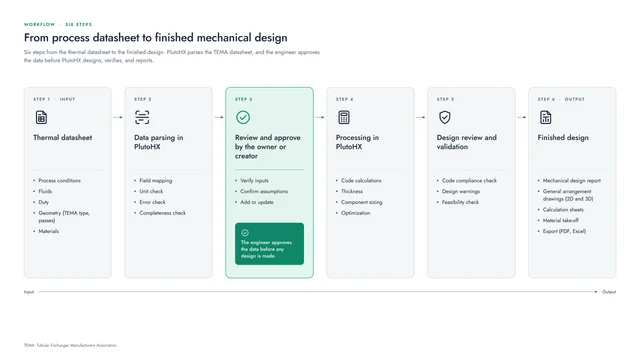
Each design follows the same path through PlutoHX, and the engineer approves the data before anything is designed.
Getting started
Three ways to start a design.
- 01Describe it in plain languageTell PlutoGen what the exchanger is for ("Generate with AI"), and it prepares the design data from your description.
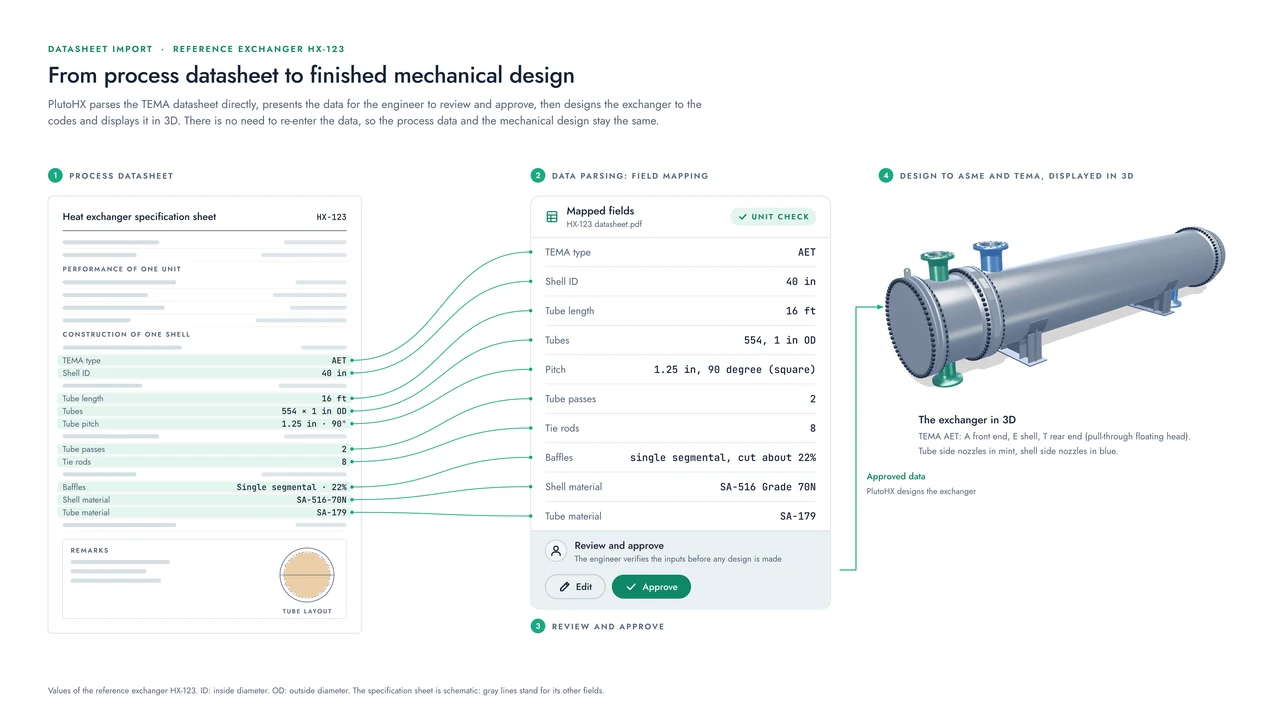
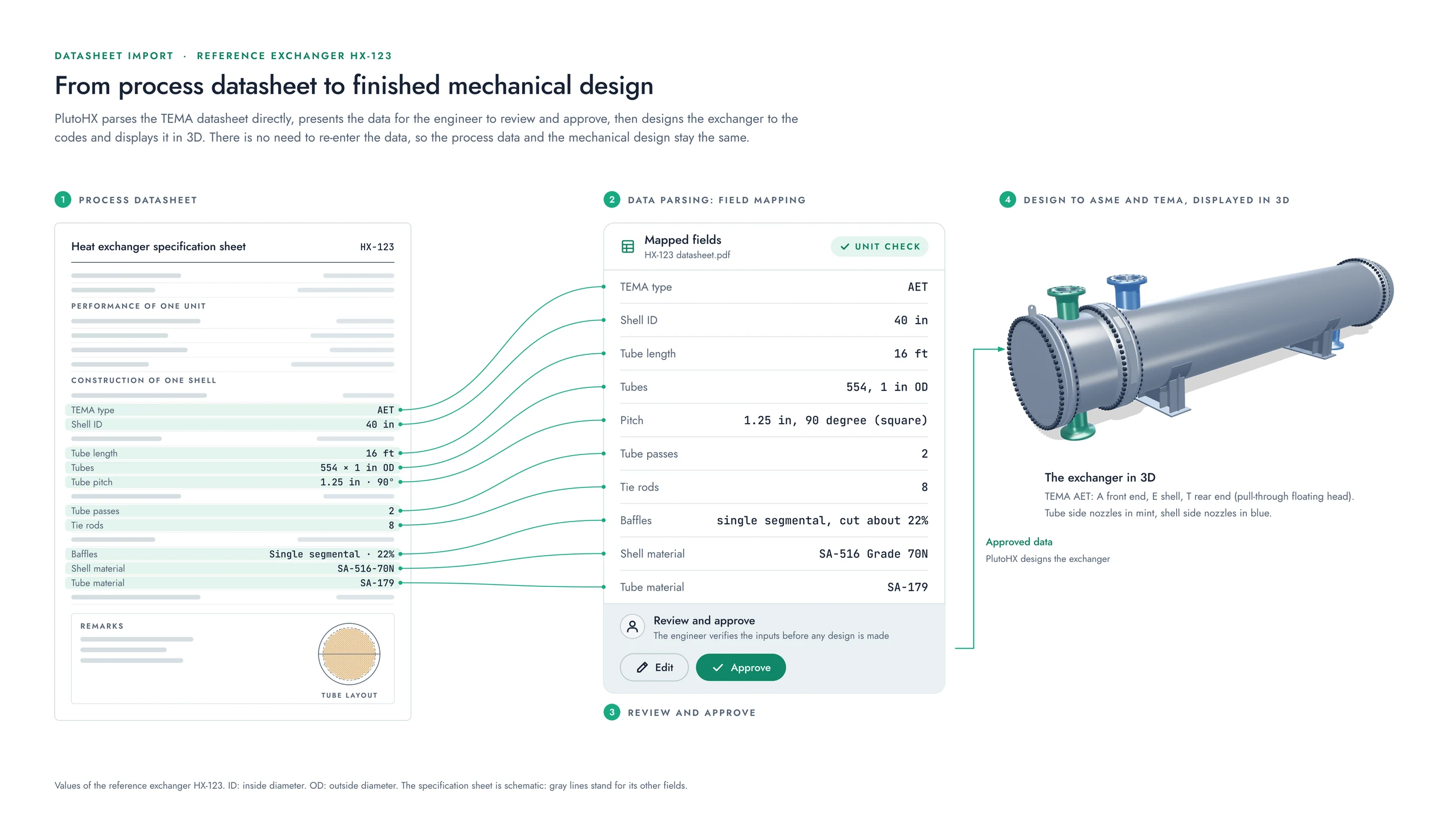
- 02Upload the TEMA datasheetAdd the datasheet as a PDF or an image, and PlutoHX parses its fields: shell geometry, tube bundle, nozzles, and baffles.
- 03Start from a templateTemplates cover common configurations, with corrosion allowances and nozzle reinforcement checks already set up. Any design can be saved as a template in the project library.
Two ways of working
PlutoGen or Classic.
A switch at the top of the screen chooses the way you work: PlutoGen, a conversation, or Classic, with forms and settings. Both work on the same model.
In Classic mode the input data sheet has five tabs: General, Front Head, Shell, Tube Bundle, and Rear Head.
The six steps
What happens at each step, and what you see.
Thermal datasheet (input)
The design starts from the process datasheet of the thermal design.
- Process conditions and fluids
- The duty
- Geometry: TEMA type and passes
- Materials
What you seeYour datasheet, attached to the design, or the description you gave PlutoGen.
Data parsing in PlutoHX
PlutoHX maps each field of the datasheet to the design and verifies what it has parsed.
- Field mapping
- Unit check
- Error check
- Completeness check
What you seeA list of what still needs attention, grouped by area, with a count of the action items left.
Review and approve
The owner or creator of the design checks the data, and nothing is designed until it is approved.
- Verify the inputs
- Confirm the assumptions
- Add or update values
What you seeThe data in the five tabs of the input data sheet, ready for your approval.
Processing in PlutoHX
PlutoHX works through the code calculations for each part.
- Code calculations
- Thicknesses
- Component sizing
- Optimization
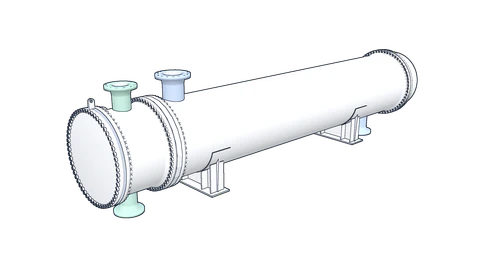
What you seeThe exchanger in 3D, changing as dimensions, passes, and nozzles change.
Design review and validation
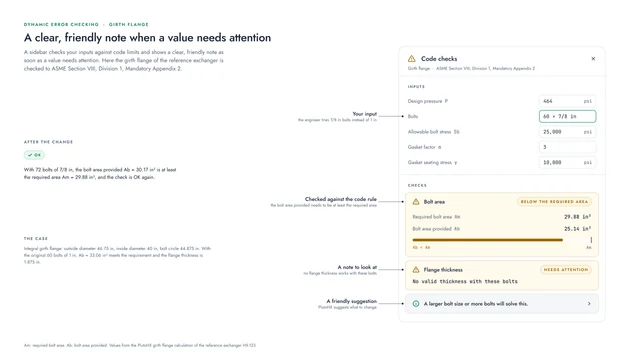
The design is verified against the codes and for how practical it is to build.
- Code compliance check
- Design warnings
- Feasibility check
What you seeFriendly notes in the sidebar wherever a value needs a second look.
Finished design (output)
The results come out as a set of documents for the project.
- Mechanical design report
- General arrangement drawings, 2D and 3D
- Calculation sheets
- Material take-off
- Export to PDF and Excel
What you seeThe calculation package, drawings, and bill of materials, ready to export.
The engineer approves
The data is approved before any design is made.
Step 3 is often the first thing engineers ask about when they hear about an AI assistant. PlutoHX and PlutoGen prepare the data; the engineer reviews it, confirms the assumptions, and approves it.
Only after that approval does PlutoHX design the exchanger, and every result keeps its formula, inputs, and code reference for anyone who reviews it later.
Built-in knowledge
What PlutoHX draws on.
The processing step works from four sources of knowledge, as the owner describes the workflow:
- ASME Section VIII, Division 1
- The TEMA Standards
- The material database of ASME Section II materials
- Design good practice
Classic mode
What you can set up in the forms.
Classic mode gives you each setting of the design as a form. The main groups are:
- General options: the exchanger type (fixed tubesheet, U-tube, or floating head), the calculation method (ASME and TEMA), the TEMA class, the TEMA type, and the shell type.
- Design conditions for the tube side and the shell side, each for design, start-up, shut-down, and upset cases: internal and external design pressure, operating pressure, and temperatures.
- Hydrostatic test conditions, the differential pressure, and whether tube pass heat treatment is required.
- Tubes and shell; baffles, placed automatically or at your own spacing; the channel and bonnet.
- Tubesheets, with their mean metal temperatures, the pitch pattern and ASME Part UHX; expansion joints, including bellows (unreinforced, reinforced, and toroidal); and liquid level conditions.
- Units: metric or imperial (US customary), chosen in the settings.
At the end: the documents
A finished design comes with its calculation package, general arrangement drawings and bill of materials, exported as PDF and Excel.
Coming Winter 2026
We would be glad to show you PlutoHX.
PlutoHX launches at the end of this year. A live demo shows how it fits the way your team works.
Visit us at the booth for a deep dive into PlutoHX.